

If you want to dominate the matches of Battlegrounds Mobile India (BGMI), your spray should be such that opponents consider you a hacker. The most important thing in an accurate hacker-like spray are the sensitivity settings, these settings control your gyroscope, camera rotation and ADS. To take perfect shots in long range, mid range and close range you will have to change your sensitivity also to perfect. Here I have shared the best bgmi sensitivity codes and settings for gyroscope players and non-gyro devices.
Sensitivity settings are an important aspect in the game and it all depends on how fast your reflexes are in combats and how smoothly you handle situations whether against long range or close-range ones. Well you can make your movements even better if you are a full gyroscope player by optimizing a few settings:
Best Sensitivity Settings for BGMI 4.5 Update
A player’s aim is what takes him towards “WWCD“ and for better aim there should be no relaxation in all your settings. If you want an aggressive gameplay then your settings should also be a little aggressive, fast and smooth.
Here, I have shared with you my personal settings which help me in giving very accurate spray on other squads. I have prepared these for BGMI 4.5 update which I have personally tested on Android, iPhone and iPad. I have recently upgraded these, so apply these settings for better aim and perfect mid-long range combats.
Lens
Camera Sensitivity:
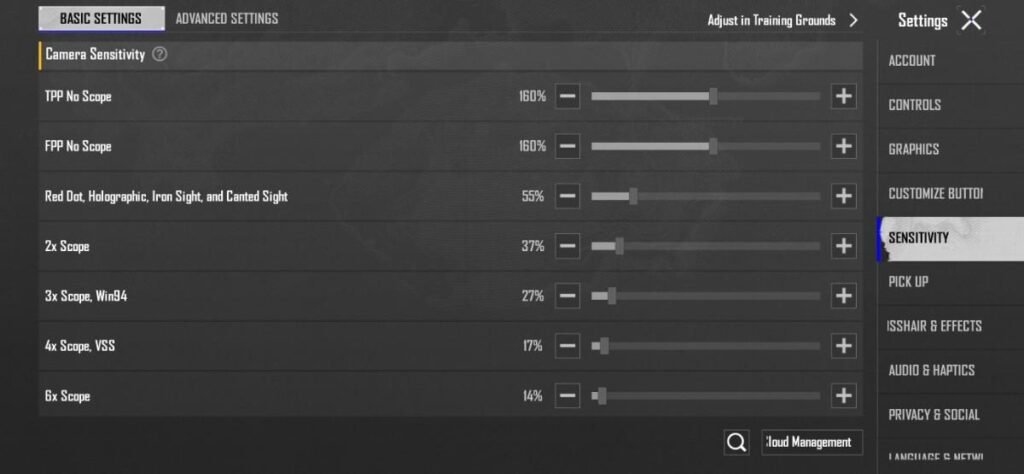
- TPP No Scope: 160%
- FPP No Scope: 160%
- Red Dot, Holographic, Iron Sight, and Canted Sight: 55%
- 2x Scope: 37%
- 3x Scope, Win94: 27:
- 4x Scope, VSS: 17%
- 6x Scope: 12%
- 8x Scope: 10%
ADS Sensitivity:
By default it is off, turn it ON manually and set the same value as lens sensitivity.
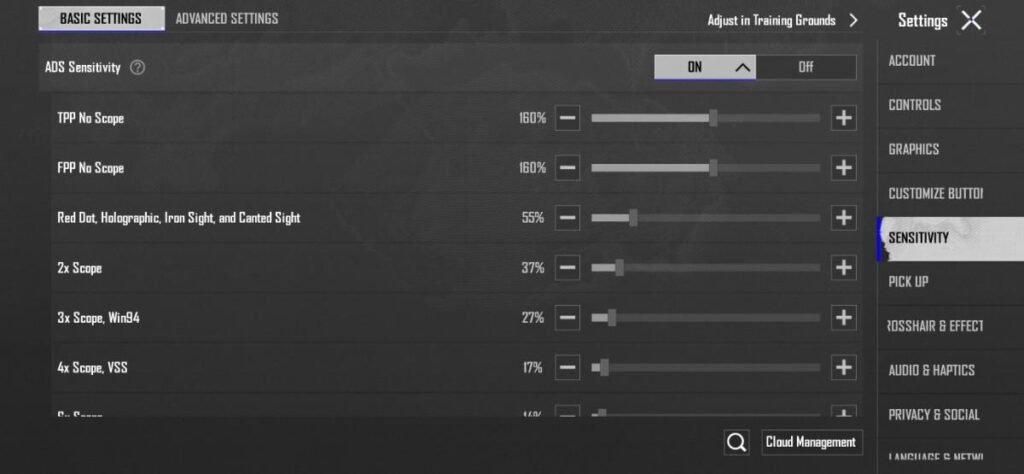
- TPP No Scope: 160%
- FPP No Scope: 160%
- Red Dot, Holographic, Iron Sight, and Canted Sight: 55%
- 2x Scope: 37%
- 3x Scope, Win94: 27:
- 4x Scope, VSS: 17%
- 6x Scope: 12%
- 8x Scope: 10%
Camera Sensitivity (Free Look):
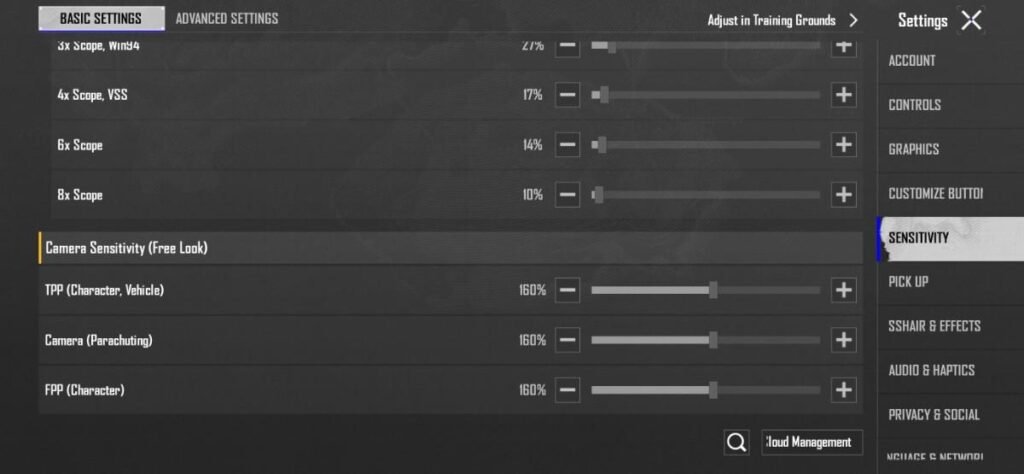
- TPP (Character, Vehicle): 160%
- Camera (Parachuting): 160%
- FPP (Character): 160%
Gyroscope Sensitivity
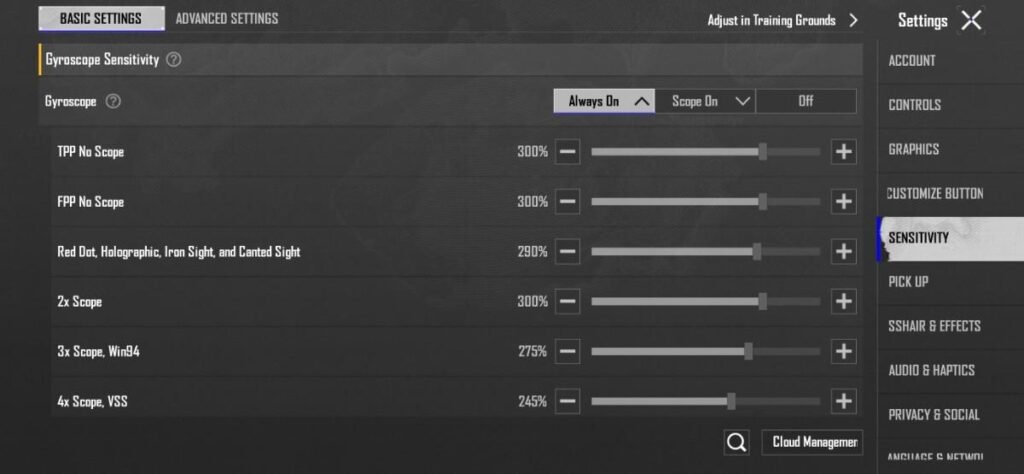
- TPP No Scope: 300%
- FPP No Scope: 300%
- Red Dot, Holographic, Iron Sight, and Canted Sight: 290%
- 2x Scope: 300%
- 3x Scope, Win94: 275:
- 4x Scope, VSS: 245%
- 6x Scope: 175%
- 8x Scope: 110%
ADS Gyroscope Sensitivity:
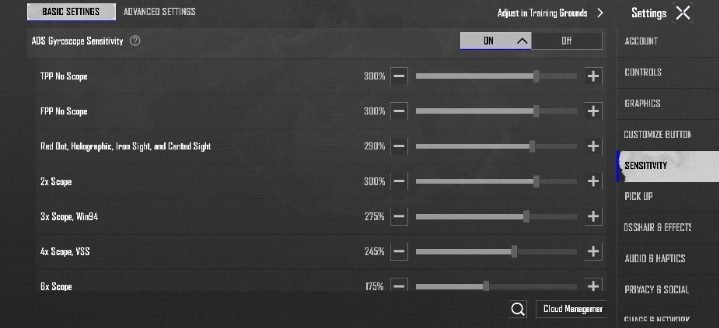
- TPP No Scope: 300%
- FPP No Scope: 300%
- Red Dot, Holographic, Iron Sight, and Canted Sight: 290%
- 2x Scope: 300%
- 3x Scope, Win94: 275:
- 4x Scope, VSS: 245%
- 6x Scope: 175%
- 8x Scope: 110%
Graphics Settings
- Graphics: Smooth
- Frame Rate: Ultra, Extreme or Higher Available like Extreme+ or Ultra Extreme (If your device supports it).
- Anti-aliasing: Disable
- Power Saving: Disable
- Shadows: Disable
- Auto-Adjusting Graphics: Disable
- Style: Soft or Colorful (I have applied Soft.)
- Brightness: 120 or 100
BGMI Sensitivity Code & Settings for Non-Gyro
I’m a Gyroscope player, and I play the game every single day by applying the sensitivity settings mentioned above. However, this doesn’t mean that I will abandon Non-Gyro players.
My teammate who plays on a low-end device is also a non-gyro player. I also fixed the BGMI lag in his device through some methods and also customized his sensitivity and in my opinion both his gameplay and car sprays have improved a lot.
Here are the sensitivity settings that you can apply manually and try out on the training ground first.
Lens Sensitivity:
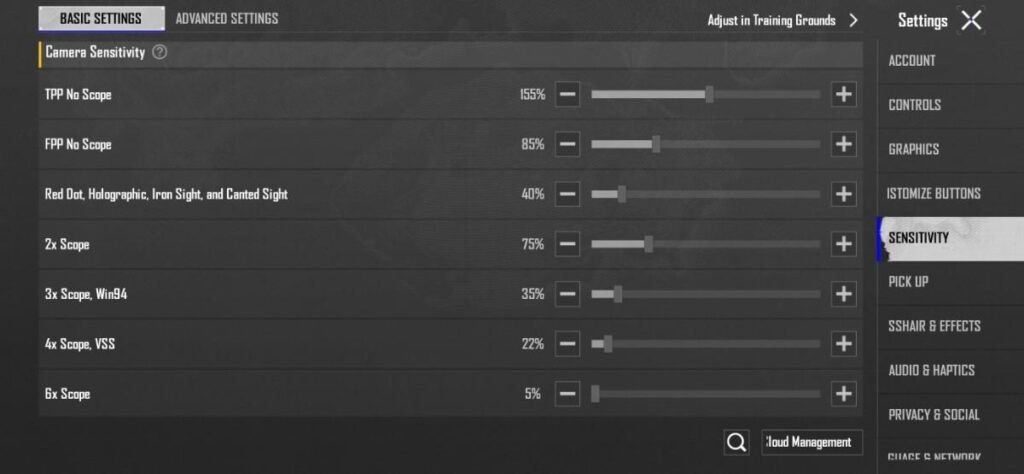
- TPP No Scope: 155%
- FPP No Scope: 85%
- Red Dot, Holographic, Iron Sight, and Canted Sight: 40%
- 2x Scope: 75%
- 3x Scope, Win94: 35:
- 4x Scope, VSS: 22%
- 6x Scope: 5%
- 8x Scope: 4%
ADS Sensitivity:
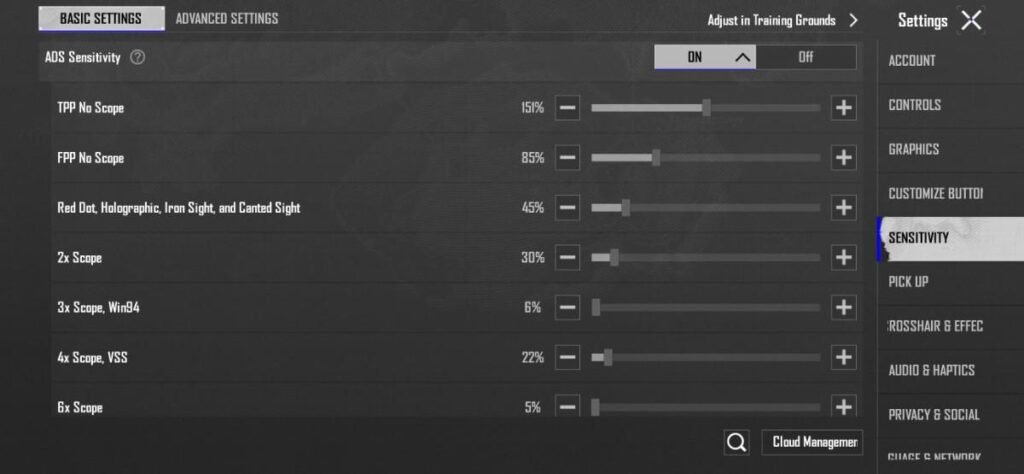
- TPP No Scope: 151%
- FPP No Scope: 85%
- Red Dot, Holographic, Iron Sight, and Canted Sight: 45%
- 2x Scope: 30%
- 3x Scope, Win94: 6:
- 4x Scope, VSS: 22%
- 6x Scope: 5%
- 8x Scope: 4%
Top Sensitivity Configurations used by Pro BGMI Players
BGMI Sensitivity codes are unique numeric codes that represent specific players’ settings that you can apply to improve gameplay. These codes are perfect for android devices:
- 7307-1085-6780-4282-435
- 7238-4185-8644-7904-942
If you are a non-gyroscope player then you can use these codes, this is one of the best sensitivity for non-gyro:
- 6983-8762-7023-5848-120
Pro Tip: After applying these settings, first go to the training ground and put all the scopes on, check your spray and adjust according to your movements.
Note: This sensitivity code may not work for all players, so you can manually adjust it from the above screenshots and hit every scope you love on the training ground.
How to Apply Sensi Codes in the Game?
Once you have a working sensitivity code, you can apply it directly to the game instead of manually adjusting all the settings:
- To start, first copy the sensitivity code.
- Now open the settings and go to your sensitivity.
- Below you will see the search icon, by clicking on it you will get an input bar in which you have to paste the code.
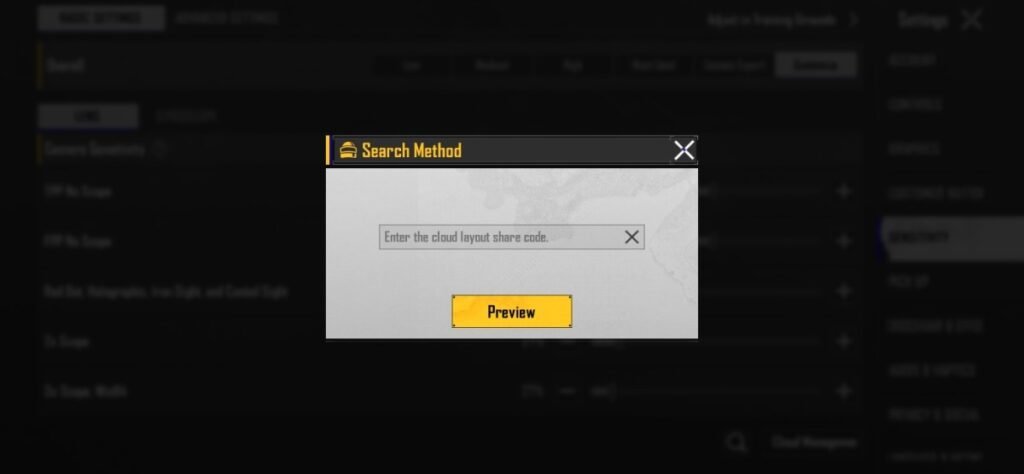
- Paste the code in the input bar.
- Now check whether the sensitivity code is correct and see its preview.
- Check all configurations in the preview and make minor adjustments if necessary.
Best BGMI Sensitivity Code FAQs
For best aim in mid-range, do not increase your lens TPP No scope above 120 and for the rest of the sensitivity you can copy the settings mentioned by me.
After applying the best sensitivity settings, land directly on the training ground and check your accuracy by spraying close-range, mid-range and long-range on all scopes and adjust the ratio if necessary.
On BGMIkhelo.com, you will get guides for all your doubts whether you want setting guide or UC giveaway or wallpapers. Apart from this, you will also get the sensitivity code shared by other streamers on YouTube.



Realme X2 8 128 GB ram sensi code
I’m currently using these sensitivity settings “1-7641-4435-1528-3538-667” and it’s the best I’ve found for the 4.4 update.
Pova tecno karo
Use the same settings I mentioned here.
agar camera rotation jyada lage to 160 ko reduce karke 140 kar dena.
I have tested 140 and it’s smooth af
best sixses senci
Bgmi 4.4 update best zero recall sensitivity
It’s best bro, try it. Main bhi yahi use kar rha hu and yeh best hai for now. 4.5 update me shayad adjustment karenge pdenge. Jab karunga yaha update kar dunga tab tk aap use kar sakte ho same settings.
Bhai sahab khatarnak hai ye bhi senc
But pure close range ke liye bhi bana do sagar bhai apka koi account ho youtube ka to bata dena
4.5 ki yaha aate hi update to yha senc de dena jase ab di h
Done bro just waiting for BGMI 4.5 Update.
Senc code